
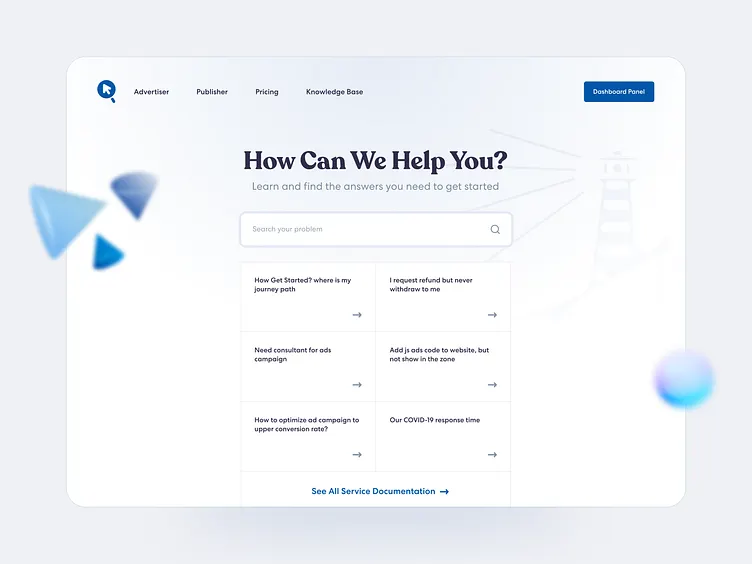
In today’s competitive digital landscape, businesses must optimize their websites for search engines to attract organic traffic. One of the most effective yet often overlooked strategies is integrating a knowledge base into your website. A knowledge base not only enhances user experience but also offers significant SEO benefits that can improve your search engine rankings and visibility.
In this article, we’ll explore the SEO benefits of a knowledge base, how it helps boost organic traffic, and best practices to maximize its impact.
How a Knowledge Base Improves SEO
A well-structured knowledge base contributes to search engine optimization (SEO) by improving website authority, reducing bounce rates, and increasing keyword rankings. Here’s how:
1. Increases Organic Traffic
A knowledge base contains articles that answer common user questions, making them valuable for search intent optimization. When people search for solutions related to your product or service, knowledge base articles can rank in Google’s search results, driving more organic traffic to your site.
✅ Example:
A software company with an article titled “How to Fix Common Login Errors” can attract users searching for “fix login error”, “troubleshoot login issues”, etc.
🔹 SEO Benefit:
- Targets long-tail keywords that bring in relevant traffic.
- Increases search engine visibility without paid ads.
2. Improves Keyword Rankings
A knowledge base allows you to optimize content for relevant keywords, helping your website rank higher on Google. By naturally incorporating primary and secondary keywords into articles, you can increase keyword density without stuffing content unnaturally.
✅ Example:
A knowledge base article on “How to Change Payment Methods” can rank for variations like:
- “Update payment details”
- “Change credit card on account”
- “Modify payment settings”
🔹 SEO Benefit:
- Expands keyword reach across multiple search queries.
- Helps rank for voice search queries (e.g., “How do I update my credit card?”).
3. Enhances User Experience (UX) and Reduces Bounce Rates
Google prioritizes websites that provide a positive user experience. A knowledge base helps users find answers quickly, reducing bounce rates and increasing time spent on site—two key ranking factors.
✅ Example:
Instead of users leaving the site frustrated, they can find a detailed guide explaining their issue, encouraging them to stay longer.
🔹 SEO Benefit:
- Lower bounce rates signal to Google that your site is valuable.
- Longer session durations improve engagement metrics, helping with rankings.
4. Boosts Featured Snippets and Zero-Click Searches
Google often displays direct answers from websites in featured snippets, also known as position zero results. A well-optimized knowledge base increases your chances of being selected for these snippets, driving highly targeted traffic to your site.
✅ Example:
A knowledge base article titled “How to Reset Your Password” can appear as a featured snippet, providing a direct answer in search results.
🔹 SEO Benefit:
- Increases brand visibility at the top of search results.
- Drives higher CTR (Click-Through Rate) without requiring ad spend.
5. Generates High-Quality Backlinks
Comprehensive, authoritative knowledge base content attracts natural backlinks from other websites, improving domain authority (DA). When external sites reference your articles, it signals to Google that your content is credible and valuable.
✅ Example:
A tech blog might link to your “Troubleshooting Common Software Errors” guide, boosting your site’s authority.
🔹 SEO Benefit:
- Improves domain trustworthiness, increasing ranking potential.
- Helps earn high-quality inbound links from relevant sources.
6. Supports Internal Linking Strategy
A knowledge base allows for effective internal linking, helping users navigate your site while distributing link authority (SEO juice) across pages. Internal links keep visitors engaged and help search engines crawl your site efficiently.
✅ Example:
An article on “How to Set Up Your Account” can internally link to:
- “Troubleshooting Login Issues”
- “Updating Your Profile Information”
🔹 SEO Benefit:
- Strengthens site structure, improving crawlability.
- Enhances user journey, encouraging deeper engagement.
7. Increases Mobile-Friendliness and Voice Search Optimization
With over 60% of searches happening on mobile devices, a mobile-friendly knowledge base ensures that users find quick answers without navigating through cluttered content. Additionally, structured FAQ-style knowledge base articles align with voice search queries like “How do I reset my password?”
✅ Example:
A well-structured FAQ knowledge base can optimize for conversational queries, increasing its chances of appearing in voice search results.
🔹 SEO Benefit:
- Improves mobile search rankings.
- Targets question-based queries, increasing visibility in voice search.
8. Reduces Customer Support Costs While Improving SEO
A knowledge base reduces customer support workload by allowing users to self-serve. This not only saves operational costs but also improves customer satisfaction, which contributes to positive online reviews—another SEO factor.
✅ Example:
Instead of contacting support, customers find their answers through a detailed knowledge base guide, reducing support tickets and improving user engagement.
🔹 SEO Benefit:
- More positive user interactions lead to higher rankings.
- Reduces customer frustration, improving site reputation.
Best Practices for Optimizing Your Knowledge Base for SEO
To maximize the SEO benefits of a knowledge base, follow these best practices:
✅ Use structured headings (H1, H2, H3) for better readability.
✅ Incorporate long-tail keywords naturally to match user queries.
✅ Optimize for featured snippets by formatting answers in bullet points or lists.
✅ Ensure fast loading speed by compressing images and optimizing code.
✅ Use a mobile-responsive design to improve mobile search rankings.
✅ Regularly update content to maintain accuracy and relevance.
Why Your Website Needs a Knowledge Base for SEO
A knowledge base is not just a support tool—it’s a powerful SEO asset that can drive organic traffic, improve engagement, and establish brand authority. By implementing a well-structured, SEO-optimized knowledge base, businesses can:
✅ Rank higher on Google by targeting long-tail keywords.
✅ Improve user experience by providing quick, reliable answers.
✅ Reduce bounce rates and increase dwell time, boosting SEO performance.
✅ Earn valuable backlinks, strengthening domain authority.
If your website doesn’t have a knowledge base, now is the time to build one. The SEO benefits of a knowledge base can significantly enhance your site’s visibility and long-term growth!