
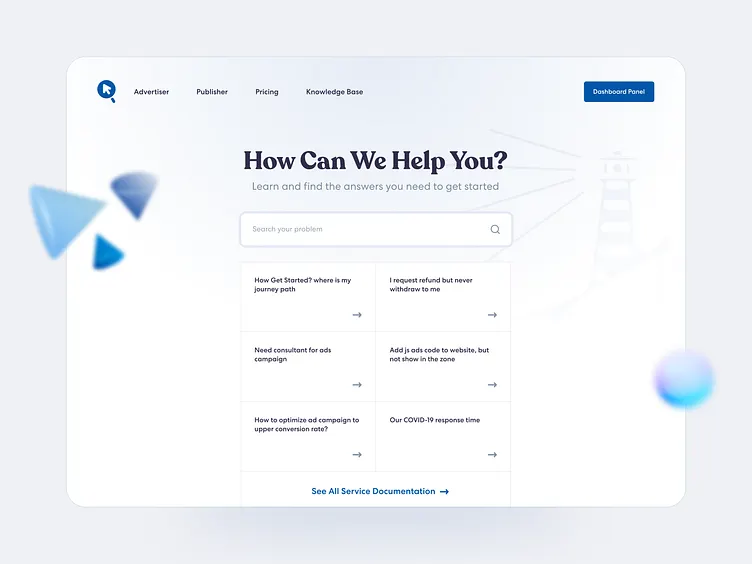
A well-organized knowledge base can significantly reduce customer support requests while improving the overall user experience. Whether you run an eCommerce store, SaaS platform, agency, or business website, having a searchable documentation hub helps visitors find answers quickly without contacting your support team.
Fortunately, WordPress offers several excellent plugins to build a professional help center. In this guide, we’ll explore the best knowledge base plugins in WordPress, comparing their features, ease of use, and ideal use cases.
1. Instant Knowledgebase
Plugin: https://wordpress.org/plugins/instant-knowledgebase/
If you’re looking for a lightweight, user-friendly solution, Instant Knowledgebase is one of the best knowledge base plugins in WordPress. It enables you to create a clean, searchable documentation portal without unnecessary complexity, making it suitable for businesses of all sizes.
Key Features
- 3+ Free Layout Styles
- Quick and simple setup
- Clean and responsive design
- Fast article search
- Organized categories
- SEO-friendly structure
- Lightweight performance
- Compatible with most WordPress themes
Pros
- Beginner-friendly interface
- Fast loading
- Easy article organization
- Ideal for product documentation and FAQs
- No coding knowledge required
Best For
- All type of businesses
- SaaS companies
- Product documentation
- Customer support portals
- Internal company documentation
If your goal is to publish documentation quickly while maintaining a professional appearance, Instant Knowledgebase is an excellent option.
2. BetterDocs
BetterDocs is a popular documentation plugin designed for businesses that need advanced customization and analytics. It includes templates, live search, and integrations with page builders.
Key Features
- Instant search
- Ready-made templates
- Analytics dashboard
- Elementor compatibility
- Table of contents
- FAQ support
Pros
- Modern design
- Rich customization options
- Large feature set
- Good integration ecosystem
Best For
Businesses that want visually polished documentation with extensive customization options.
3. Heroic Knowledge Base
Heroic Knowledge Base is a premium plugin focused on delivering professional customer support documentation. It emphasizes advanced search functionality and user feedback.
Key Features
- AJAX live search
- Article feedback system
- Drag-and-drop article ordering
- Category management
- Analytics and reporting
Pros
- Powerful search
- Professional user experience
- Excellent organization tools
- Premium support
Best For
Growing companies that require advanced documentation and customer self-service features.
4. Echo Knowledge Base
Echo Knowledge Base offers a flexible approach to creating documentation with multiple layouts and organizational options. It supports FAQs, knowledge bases, and help centers.
Key Features
- Multiple layout styles
- Live search
- Accordion FAQs
- Category icons
- Responsive design
Pros
- Flexible layouts
- Easy customization
- Mobile-friendly
- Good navigation
Best For
Businesses looking for a visually customizable help center.
5. BasePress
BasePress focuses on simplicity while providing the essential features needed to organize documentation into multiple sections and categories.
Key Features
- Multiple knowledge bases
- Live search
- Responsive layout
- Category organization
- Breadcrumb navigation
Pros
- Lightweight
- Easy to manage
- Clean interface
- Suitable for growing documentation
Best For
Businesses managing multiple products or services that require separate documentation areas.
How to Choose the Best Knowledge Base Plugin in WordPress
When selecting a plugin, consider the following factors:
- Ease of setup and use
- Search functionality
- Mobile responsiveness
- SEO-friendly architecture
- Performance and speed
- Theme compatibility
- Customization options
- Ongoing updates and support
The right plugin depends on your documentation needs, technical experience, and the size of your website.
Why a Knowledge Base Matters
A well-structured knowledge base offers several benefits:
- Reduces repetitive support tickets
- Improves customer satisfaction
- Provides 24/7 self-service support
- Boosts website SEO through helpful content
- Saves time for support teams
- Builds trust with users by providing accessible information
By helping visitors solve common issues on their own, you can improve both user experience and operational efficiency.
Choosing one of the best knowledge base plugins in WordPress can transform the way you deliver support and documentation. While each plugin on this list has its strengths, Instant Knowledgebase stands out for its lightweight design, ease of use, responsive interface, and quick setup. It offers a practical solution for businesses that want to create a professional knowledge base without unnecessary complexity.
Whether you’re building a customer help center, product documentation library, or internal wiki, investing in the right knowledge base plugin can improve user satisfaction, streamline support, and help your website scale more effectively.