
Internal linking is one of the most practical SEO techniques available to WordPress site owners. It helps users discover related content, supports clearer site architecture, and gives search engines additional context about how pages connect.
However, internal linking only works well when it is intentional.
Adding random links throughout blog posts will not automatically improve rankings. A useful strategy requires relevance, logical page relationships, descriptive anchor text, and consistent maintenance across posts, pages, categories, and products.
That is why a structured internal linking SEO WordPress approach is more valuable than simply inserting hyperlinks whenever convenient.
In this guide, you will learn how to build a practical internal linking strategy for WordPress, including where to place links, how to choose anchor text, which pages deserve priority, and how ecommerce sites can connect blog content with product pages.
What Is Internal Linking in WordPress?
An internal link connects one page on your website to another page on the same domain.
For example, if you publish a WordPress tutorial about improving website speed and link to another article about image optimization, that is an internal link.
Likewise, a WooCommerce blog post linking to a product category is also an internal link.
Internal links commonly connect:
- blog posts to related blog posts
- posts to cornerstone pages
- pages to service pages
- blog posts to product categories
- product pages to buying guides
- category pages to important resources
- documentation pages to related tutorials
The purpose is not only navigation.
Internal links also help establish relationships between your content.
Why Internal Linking Matters for SEO
Search engines discover and interpret websites partly through links.
A strong internal linking structure can help crawlers locate pages, understand topic relationships, and identify which pages appear more important within a website.
For users, internal links make it easier to move from broad information to more detailed resources.
Consider a WordPress site focused on website performance.
A broad guide could link to individual articles about:
- caching
- image compression
- hosting
- databases
- Core Web Vitals
Those supporting pages could then link back to the main performance guide.
This creates a clearer topical structure.
A good internal linking SEO WordPress strategy therefore serves two audiences at once: users and search engines.
Build an Internal Linking Strategy Around Site Structure
A strong internal linking strategy begins with understanding your website hierarchy.
Not every page should receive the same number of internal links.
Some pages are more important because they target competitive topics, generate revenue, support conversions, or act as central guides.
A typical WordPress content structure might include:
Homepage
↓
Main category or service pages
↓
Pillar content
↓
Supporting articles
↓
Specific tutorials or product pages
Internal links should help users move naturally through this structure.
For example, supporting articles can link back to a broader pillar page while also connecting to closely related posts.
This creates a logical network instead of a collection of isolated pages.
WordPress SEO Internal Links for Blog Posts
Blog posts are usually the easiest place to build internal links.
Every time you publish a new article, look for opportunities to connect it with existing content.
Suppose you write:
How to Speed Up WordPress Without Changing Hosting
Inside that post, you might naturally link to articles about:
- caching plugins
- image optimization
- lazy loading
- database cleanup
- theme performance
These WordPress SEO internal links help readers explore specific subtopics.
However, relevance should guide every link.
Do not add a link simply because another page contains a keyword you want to promote.
The destination should genuinely help the reader.
Link New Posts to Older Content
One of the easiest internal linking habits is linking new articles to older ones.
Writers naturally remember recent content, but older evergreen posts can easily become neglected.
Before publishing a new post, search your existing content library for related topics.
If you mention WordPress backups and already have a complete backup guide, link to it.
If you discuss image compression and have a tutorial on WebP images, connect them.
This process helps prevent valuable older articles from becoming isolated.
Link Older Posts to New Content
The reverse direction is just as important.
Older articles cannot automatically reference content that was published later.
For example, a WordPress SEO guide published two years ago might not link to newer articles about:
- AI search visibility
- updated Core Web Vitals guidance
- schema markup
- newer Gutenberg features
- recent WooCommerce SEO strategies
When you publish an important new article, identify older pages that should link to it.
This creates stronger two-way content relationships.
Internal Linking SEO WordPress Strategy for Pages
WordPress pages often have different purposes from blog posts.
They may include:
- service pages
- landing pages
- about pages
- pricing pages
- contact pages
- feature pages
- product information pages
Internal links to these pages should usually come from relevant informational content.
For example, an agency offering WordPress speed optimization could link from a technical article about slow websites to its performance service page.
The link is useful because the commercial page directly relates to the problem being discussed.
Avoid forcing commercial links into unrelated informational content.
The connection should make sense for the user.
Anchor Text SEO: Why Link Wording Matters
Anchor text is the clickable text used in a hyperlink.
It gives users context about where the link leads.
Compare these examples:
Weak:
“Click here for more information.”
Better:
“Read our WordPress image optimization guide.”
The second version tells the reader exactly what to expect.
For anchor text SEO, descriptive wording is generally preferable to vague text.
However, do not force exact-match keywords into every anchor.
Natural variation is better.
For example, a page targeting WordPress security might receive links using:
- WordPress security guide
- secure your WordPress site
- improve WordPress security
- website security checklist
These variations remain descriptive without sounding repetitive.
Avoid Over-Optimizing Anchor Text
Anchor text should sound natural within the sentence.
If every link to a page uses the same keyword phrase, the content can feel mechanical.
For example:
“Read our WordPress SEO guide.”
“See our WordPress SEO guide.”
“Learn more in our WordPress SEO guide.”
Using the same phrase repeatedly across dozens of pages can reduce readability.
A better approach is to match the anchor to the context of each paragraph.
This keeps internal linking helpful rather than formulaic.
Contextual Internal Links WordPress Sites Should Prioritize
Contextual internal links are links placed inside the main body of content.
They are often more useful than generic footer or sidebar links because they appear when the topic is directly relevant.
For example:
“Large images can slow page loading times, so image compression is an important part of performance optimization.”
If you have an article about image compression, linking that phrase creates a contextual connection.
This is one of the strongest forms of internal linking SEO WordPress implementation because the link appears exactly where the reader may want additional detail.
The surrounding content also provides context about the destination.
Internal Linking for WooCommerce Products
WooCommerce sites need a slightly different approach.
A typical ecommerce site may contain:
- products
- categories
- collections
- blog posts
- buying guides
- comparison pages
- FAQs
Internal linking can connect informational content with commercial pages.
For example, an article titled:
How to Choose a Mechanical Keyboard for Programming
could link to:
- mechanical keyboard category
- keyboard switch guide
- specific keyboard products
- ergonomic accessories
This gives users a natural path from research to product discovery.
Link Blog Posts to Product Pages Carefully
Product links should be relevant to the article.
If a blog post discusses a specific product type, linking to that product or category can be useful.
However, avoid turning every product mention into a link.
Too many commercial links can make informational content feel promotional.
A good rule is to ask whether the product destination genuinely helps the reader at that point in the article.
If yes, the link is appropriate.
If not, leave it out.
Product Pages Should Link to Helpful Content
Internal linking should also move in the opposite direction.
Product pages can link to useful educational resources.
For example, a coffee machine product page might link to:
- a coffee brewing guide
- maintenance instructions
- grind size recommendations
- comparison content
This helps users who are still researching.
It also connects product pages with relevant informational topics.
Category Pages Can Be Important Internal Linking Targets
Category pages often represent valuable commercial keywords.
Examples might include:
- gaming laptops
- hiking backpacks
- office chairs
- skincare products
- WordPress plugins
Relevant blog posts can link to these categories when the reader would benefit from seeing multiple options.
For example:
A blog post called Best Office Setup for Remote Workers could link to categories for office chairs, standing desks, and monitors.
This is often more useful than linking to one individual product.
Use Topic Clusters for Better Internal Linking
Topic clusters make internal linking easier to manage.
A cluster usually includes one broad pillar page supported by several narrower articles.
For example:
Pillar: Complete WordPress SEO Guide
Supporting articles:
- internal linking guide
- image SEO guide
- schema markup guide
- technical SEO checklist
- speed optimization guide
Each supporting article should link back to the pillar where relevant.
The pillar should also link to supporting content.
This creates a structured topic network.
A well-planned internal linking strategy can therefore reinforce both navigation and topical organization.
Find and Fix Orphaned Content
Orphaned content receives few or no internal links from other pages.
This can happen when:
- an article is old
- it was published outside the main content workflow
- newer writers do not know it exists
- site structure changed
- internal links were removed
Important orphaned pages should be reviewed.
Find related content and add links where appropriate.
Not every page needs many internal links, but strategically important pages should usually be connected to the wider site.
Use Internal Links to Support Important Pages
Some pages deserve more internal visibility than others.
These might include:
- major service pages
- top product categories
- high-converting landing pages
- cornerstone guides
- strategic comparison pages
Supporting content can link to these pages naturally.
However, importance alone is not enough.
The link must still be relevant.
A finance article should not link to a WordPress service page simply because the service page is commercially important.
Relevance comes first.
How Many Internal Links Should a Page Have?
There is no universal number that works for every article.
A 700-word post may need only a few internal links.
A 4,000-word guide may naturally include dozens.
Instead of targeting a fixed number, focus on usefulness.
Add a link when:
- the reader would benefit from more detail
- another page directly expands the topic
- the destination fits the current context
- the link improves navigation
Do not insert links just to reach a quota.
Review Internal Links During Content Updates
Internal linking should be part of your content maintenance process.
Whenever you update an older post, review its links.
Check for:
- outdated URLs
- deleted pages
- irrelevant destinations
- missing links to new content
- vague anchor text
- discontinued products
This keeps your internal linking structure current.
It also creates opportunities to connect newer content with older high-performing pages.
Use a WordPress Internal Linking Tool for Larger Sites
Manual internal linking works well for small websites.
However, once a site grows to hundreds or thousands of pages, remembering every relevant destination becomes difficult.
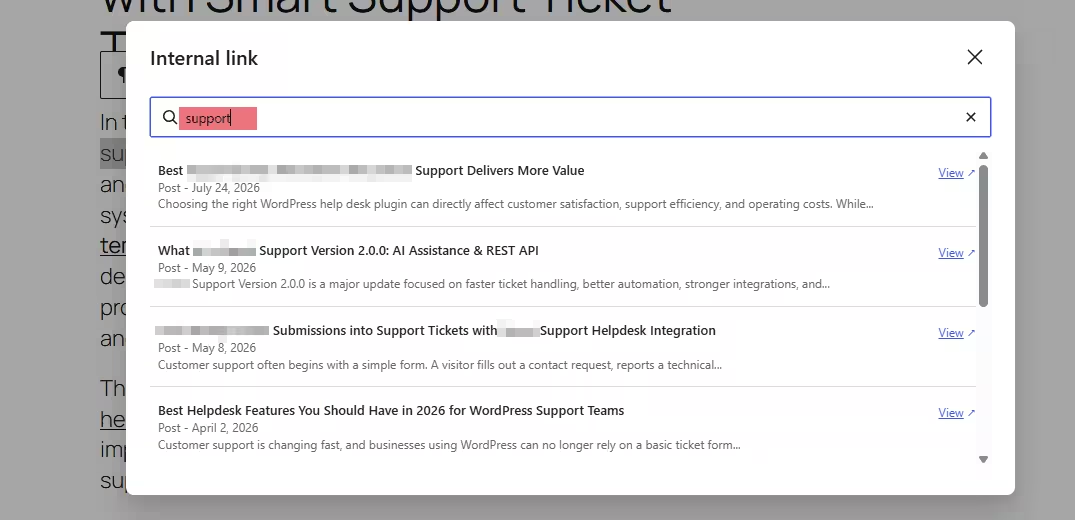
This is where an internal linking plugin can help.
Tools such as WordPress Internal Post Linker can make it easier to discover existing posts while editing content.
That can reduce the need to leave the editor, search manually through the Posts screen, copy URLs, and return to the draft.
For larger content libraries, this type of workflow improvement can make internal linking more consistent.
The tool should support editorial decisions rather than automatically insert every possible link.
A Practical Internal Linking Workflow
A repeatable process can make internal linking easier to maintain.
When publishing or updating content:
- Identify the main topic.
- Find relevant older articles.
- Link to important pillar pages where appropriate.
- Add contextual internal links.
- Use descriptive anchor text.
- Review commercial pages that may be relevant.
- Check whether older pages should link back to the new content.
- Review orphaned or underlinked pages.
- Test important links before publishing.
This workflow works for blogs, service sites, documentation portals, and WooCommerce stores.
Common Internal Linking Mistakes
Several problems can weaken an otherwise strong strategy.
One mistake is linking every keyword occurrence.
Another is using vague anchors such as “click here” repeatedly.
Some websites also over-prioritize commercial pages, creating links that feel unnatural.
Other common issues include:
- broken internal links
- linking to redirected URLs unnecessarily
- ignoring old content
- forgetting category pages
- repeatedly linking the same destination
- using irrelevant anchor text
A good internal linking strategy focuses on quality and context rather than volume.
A successful internal linking SEO WordPress strategy connects posts, pages, categories, and products in a way that helps both users and search engines understand your site.
Start with relevance.
Link blog posts to genuinely useful supporting content. Connect important pages to related informational resources. Use descriptive anchor text, create contextual internal links, and review older content regularly.
WooCommerce sites should also connect blog posts with relevant product and category pages while avoiding excessive promotional linking.
As your site grows, manual discovery becomes more difficult. Tools such as WordPres Internal Post Linker Plugin can help streamline the process by making relevant internal content easier to find during editing.
Internal linking does not need to be complicated.
A consistent structure, natural anchor text, contextual relevance, and regular maintenance can turn internal links into one of the most useful parts of your broader WordPress SEO strategy.