
Selling software through WooCommerce is not just about processing payments. After purchase, customers need quick access to license keys, activation details, software downloads, renewal information, and support options. When this information is hard to find, customers often open support tickets for simple tasks such as recovering a key, checking activation limits, or downloading a file.
That is why a WooCommerce license key dashboard is so important for software sellers. It gives customers a clear self-service area where they can view and manage their software license keys without searching through order emails or multiple My Account pages.
Many WooCommerce license manager tools focus on generating, validating, and controlling licenses. Those features are essential for store owners. However, customers also need a better front-end experience. A SaaS-style dashboard adds that missing customer-facing layer by making license information easier to understand and manage.
Why Software Stores Need Customer-Facing License Key Management
A software store has different customer account needs compared with a traditional online shop. A customer who buys a physical product may only need shipping updates and order history. A customer who buys software usually needs ongoing access to license data.
For example, a WordPress plugin customer may need to copy a license key after installation. A business user may need to check how many activations are available. A developer may need to download the latest version after changing devices. A finance team may need to view the invoice connected to the same purchase.
Without a WooCommerce license key dashboard, this information can become scattered. The customer may need to check emails, order details, downloads, license manager pages, and billing records separately. This creates friction and makes the account experience feel less professional.
A customer-facing license dashboard solves this by organizing license-related information in one place. It gives customers control and helps your support team focus on more important requests.
Common Customer Issues with WooCommerce Software License Keys
Customers often contact support because they cannot find or understand their WooCommerce software license keys. These issues are common, especially when a store sells plugins, themes, desktop software, SaaS access, or downloadable tools.
One common problem is lost license keys. Customers may delete purchase emails, change inboxes, or forget where the key was shown after checkout. If the My Account area does not make the license easy to find, the customer may open a ticket.
Another issue is activation limits. A customer may try to activate the software on a new website, device, or environment and receive an error. Without clear activation information, they may not know whether the license has reached its limit.
Expired licenses can also cause confusion. Customers may not understand whether the key is inactive, the subscription has expired, or renewal payment failed. If license status and subscription details are shown separately, the customer experience becomes harder to manage.
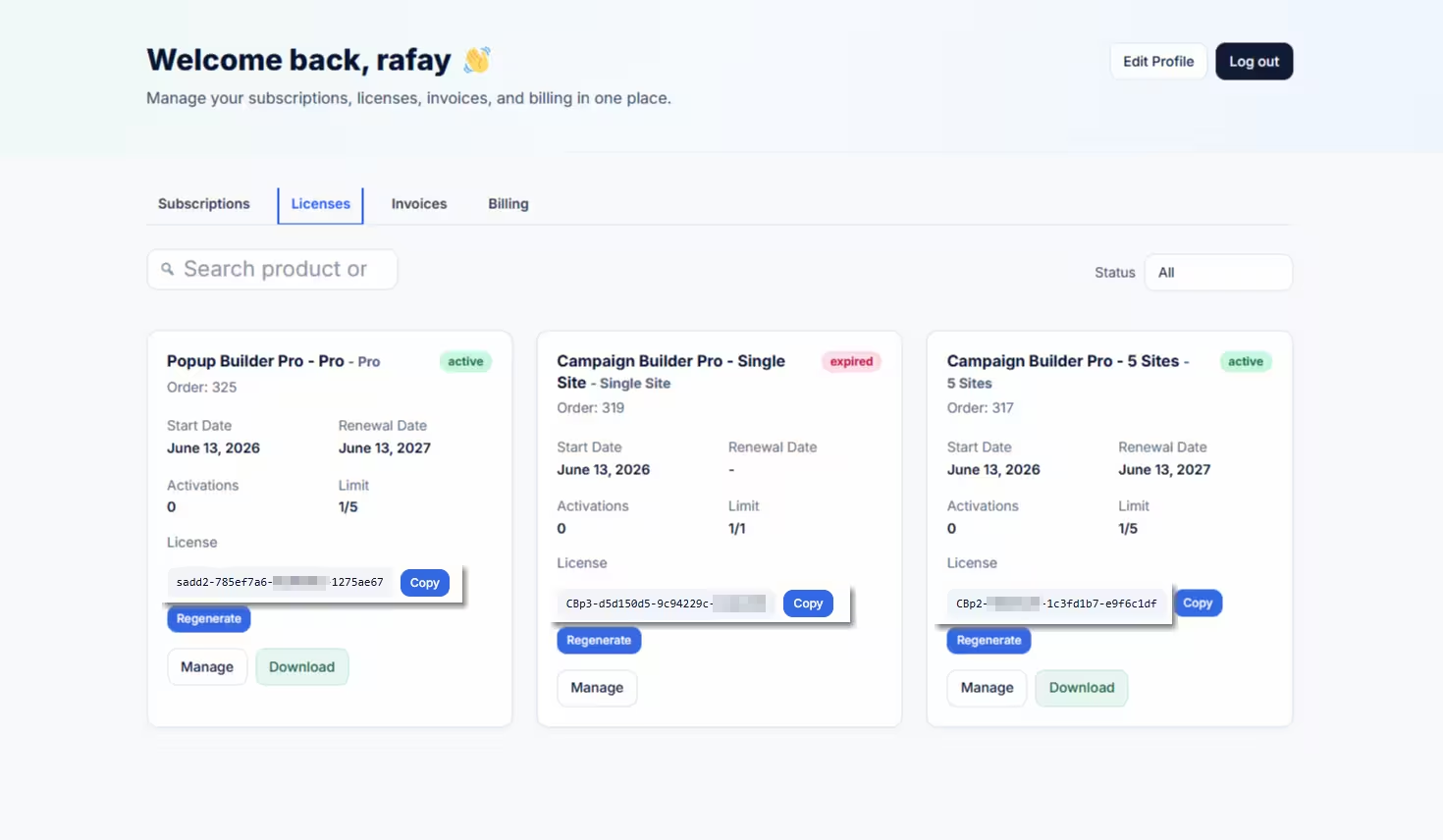
A WooCommerce license key dashboard can reduce these problems by showing the license key, activation count, license limit, downloads, and available actions in a simple customer-facing view.
What Should a WooCommerce License Key Dashboard Show?
A good license dashboard should show the information customers need most often. It should be practical, clear, and connected to the product they purchased.
At a minimum, a WooCommerce license key dashboard should display the product name, license key, license status, activation count, license limit, available downloads, and useful customer actions.
The license key should be easy to copy. A copy button saves time and reduces typing mistakes, especially for long software keys. Customers should not need to manually highlight a key from an order email or contact support to retrieve it.
A regenerate option can also be useful when supported by the license system. If a customer believes a key has been exposed, misused, or needs to be replaced, regeneration gives them a controlled way to update access.
A manage action is equally important. Customers may need to manage activations, view connected domains, or review license usage. Placing this action directly on the license card makes the workflow easier.
For software businesses, the best dashboard is not just a list of keys. It is a complete customer license management area.
Activation Count vs License Limit
Activation details are one of the most important parts of a customer-facing license dashboard. Customers need to know how much of their license they have used and how much remains available.
The activation count shows how many sites, devices, or installations are currently using the license. The license limit shows the maximum number of activations allowed.
For example, a customer may have a license limit of five and an activation count of three. That means the customer can still activate the software two more times. Showing this clearly helps customers understand their plan without asking support.
A WooCommerce license key dashboard should make this distinction easy to read. Displaying activation information as a clear “Limit” value can help customers quickly understand their usage.
This is especially useful for agencies, developers, and business customers who manage several websites or installations. They need to know whether they can add another activation or whether they should upgrade their plan.
Download Files Linked to License Cards
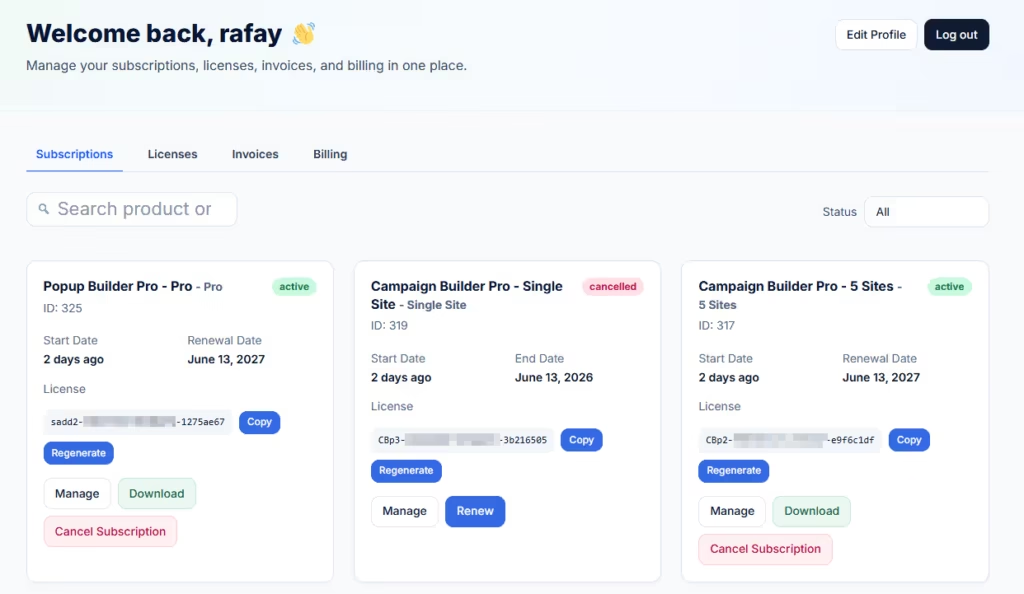
Software customers often need downloads and license keys at the same time. For example, after purchasing a plugin, the customer may need to download the plugin file and copy the license key for activation. If these details are shown in separate areas, the experience becomes less efficient.
A modern WooCommerce license key dashboard should show downloadable product files directly on the license card when available. This makes the workflow much smoother.
Instead of visiting one page for downloads and another page for license keys, the customer can find everything connected to that software product in one place. This is especially helpful when a customer has purchased multiple products or subscriptions.
Download visibility also reduces support requests. Customers are less likely to ask, “Where can I download the product?” when the file is clearly linked beside the license key.
For digital product sellers, this small improvement can make the account area feel much more like a professional SaaS portal.
Why Traditional WooCommerce License Manager Tools Are Not Always Enough
A WooCommerce license manager is essential for generating, assigning, validating, and controlling software licenses. However, many license management tools are built primarily for administrators, not customers.
Store owners need back-end controls, but customers need front-end clarity. They want a clean view of the licenses they own, what each key unlocks, how many activations are available, and where to download the software.
This is where a customer-facing dashboard becomes valuable. It does not replace your license manager. Instead, it improves how customers interact with license data inside their account area.
For stores using a software license plugin WooCommerce setup, this dashboard layer can become the bridge between technical license records and a user-friendly account experience.
A customer does not need to see every technical field. They need simple answers: what is my key, is it active, how many activations do I have, and what can I do next?
How SaaS Dashboard for WooCommerce Improves License Visibility
SaaS Dashboard for WooCommerce replaces the default WooCommerce My Account dashboard with a focused SaaS-style account area for software customers. It is designed for stores that sell subscriptions, downloadable software, and license-protected products.
For license management, the plugin displays software license keys with customer-friendly actions such as copy, regenerate, and manage. It can also show activation count, downloads, and license limit information.
This means customers can view their license key, understand their usage, download related files, and take action from one organized dashboard card.
The plugin is especially useful for stores using WooCommerce, WooCommerce Subscriptions, Paddle for WooCommerce or SmartPay Paddle Woo, and the Software License plugin by NSP Code. Together, these tools can power a strong software sales system, while SaaS Dashboard for WooCommerce improves the customer-facing account experience.
Instead of forcing customers to dig through orders, emails, and separate account pages, the plugin brings key software details into a cleaner dashboard. This makes the customer experience easier and reduces the need for basic support tickets.
Business Benefits of a Better License Dashboard
A better WooCommerce license key dashboard can help both customers and store owners.
For customers, it creates a faster and more reliable way to manage software access. They can find keys, copy them, check usage, download files, and manage license actions without waiting for support.
For store owners, it reduces repetitive tickets about missing keys, download links, activation limits, and expired licenses. It also creates a more professional post-purchase experience, which is important for software and SaaS businesses.
Customer trust matters after the sale. When users log into their account and immediately see a clean license dashboard, they are more likely to feel confident in your product and your business.
This can also support renewals. If customers understand their license status and activation limits, they are more likely to renew, upgrade, or continue using the software.
Software sellers need more than a basic WooCommerce order history page. Customers need a clear way to access and manage license keys, activation counts, license limits, downloads, and related actions.
A WooCommerce license key dashboard gives customers a self-service experience that reduces confusion and support requests. It helps users recover lost keys, understand activation usage, download software files, and manage their license from one place.
SaaS Dashboard for WooCommerce improves the default My Account experience by adding a customer-facing SaaS dashboard for licenses, subscriptions, invoices, billing, and downloads. For software businesses, this creates a cleaner and more useful account area.
Let customers view and manage their software license keys without opening a support ticket.