
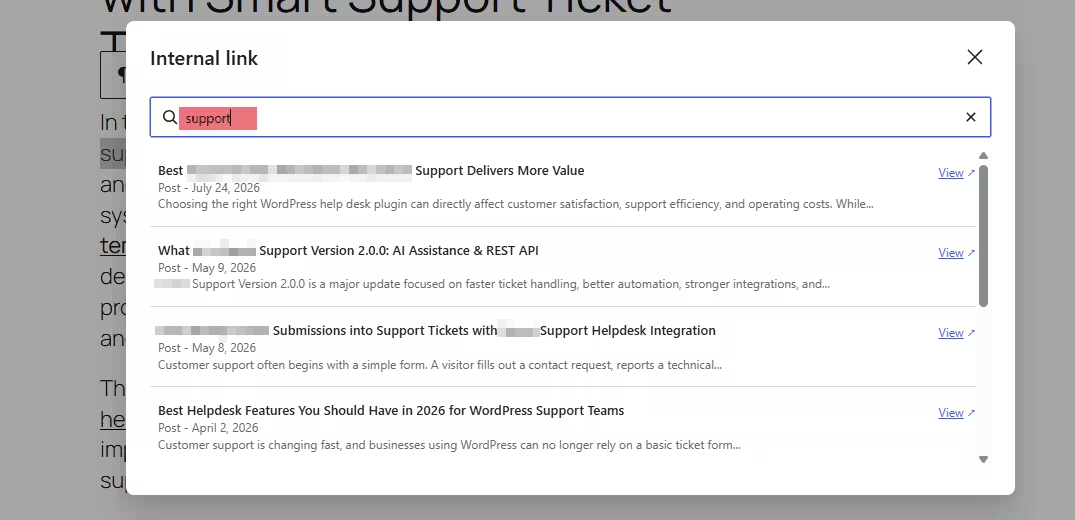
Internal linking is one of the most practical ways to improve website navigation, strengthen content relationships, and help search engines understand how pages on your site connect. However, managing internal links manually becomes increasingly difficult as a WordPress site grows.
That is where a free internal linking plugin WordPress users can install becomes useful.
The challenge is that not every plugin offers the same functionality. Some simply help you search for posts faster, while others suggest relevant pages, analyze existing links, detect orphaned content, or automate parts of the internal linking process.
So, what actually makes a good internal linking plugin?
Instead of choosing a tool based only on the number of features listed on its product page, website owners should focus on features that improve their day-to-day content workflow without creating unnecessary complexity.
This guide explains the most important features to evaluate when searching for the best free internal linking plugin for WordPress.
Why Use an Internal Linking Plugin?
WordPress already allows users to insert links manually from the block editor. You can highlight anchor text, select the link option, search for an existing post, and add the URL.
For smaller websites, that process is often sufficient.
However, problems begin to appear as a content library expands.
If your website contains hundreds of articles, you may not remember every relevant page that could be linked from a new post. Older content may gradually become disconnected, while new writers may have little knowledge of what has already been published.
A WordPress internal linking plugin can reduce this friction.
Depending on the plugin, it may help you discover relevant posts, locate orphaned pages, identify linking opportunities, or streamline link insertion directly from your WordPress workflow.
Therefore, choosing the right free internal linking plugin WordPress solution is less about automation alone and more about making internal linking easier to manage consistently.
What Features Matter in a Free Internal Linking Plugin WordPress Users Choose?
A long feature list does not automatically make one plugin better than another.
In practice, the most useful features are those that solve common internal linking problems without slowing down the editing experience.
Here are the capabilities worth prioritizing.
1. Relevant Internal Link Suggestions
One of the most useful features in any internal link plugin is the ability to surface relevant existing content.
Imagine you are writing an article about improving WordPress website speed.
A good plugin might help you discover existing posts covering:
- Image optimization
- WordPress caching
- Core Web Vitals
- Hosting performance
- Database optimization
Without suggestions, you may only link to articles you personally remember.
This is especially important for larger websites where editors may be responsible for hundreds or thousands of URLs.
The best internal linking plugin should therefore make content discovery easier rather than simply automate links without context.
2. Easy Link Insertion Inside the Editor
Workflow matters.
If an internal linking plugin requires you to constantly switch between dashboards, reports, and editing screens, it may actually make content production slower.
Ideally, the tool should help you find or insert links while you are already editing a post.
This is one reason editor-based tools can be attractive.
For example, a plugin such as 7Sky Internal Post Linker can fit naturally into a WordPress content workflow by helping users find relevant internal posts without repeatedly leaving the editing environment.
For writers and editors, that reduction in interruption can matter more than advanced features they rarely use.
3. Clear Anchor Text Control
Any internal link plugin free or paid should leave you in control of anchor text.
Anchor text is the clickable text used for a link. It should make sense in context and give readers a reasonable idea of what they will find after clicking.
For example:
Poor anchor text:
“Click here.”
Better anchor text:
“Learn how to optimize WordPress images.”
The second example gives both users and search engines more useful context.
Some tools focus heavily on automatic insertion. However, excessive automation can create unnatural or repetitive anchor text.
Therefore, a good plugin should help you discover linking opportunities without taking away editorial control.
4. Orphaned Content Detection
Orphaned content refers to pages that receive few or no internal links from other pages on the same website.
These pages can be difficult for visitors to discover.
For larger sites, identifying such content manually can be time-consuming. A WordPress internal linking plugin with orphaned-page reporting can therefore provide significant value.
When evaluating a free plugin, check whether it can highlight posts with limited internal links.
This feature can be especially useful for:
- Large blogs
- Affiliate websites
- News publications
- SaaS resource centers
- E-commerce content hubs
- Documentation websites
However, remember that not every orphaned page necessarily requires dozens of links. Relevance should still guide your decisions.
5. Internal Link Reporting
Visibility is another important feature.
A useful internal linking plugin may provide information such as:
- How many internal links point to a post
- How many links a post contains
- Which pages have few inbound links
- Which content receives frequent internal links
- Whether internal links point to broken or outdated URLs
These reports can help editors understand the structure of a large content library.
If you are comparing options for the best internal linking plugin, reporting is often more valuable than flashy automation because it helps you make informed editorial decisions.
6. No Forced Automatic Linking
Automatic linking sounds convenient.
For example, a plugin could detect a specific keyword and automatically link every occurrence to a predefined page.
This can save time, but it can also create problems.
Imagine automatically linking the phrase “WordPress hosting” every time it appears. A long article could end up with the same link repeated several times, resulting in poor readability.
Context also matters. The keyword may appear in a sentence where that destination page is not particularly relevant.
Therefore, a free internal linking plugin WordPress users rely on should ideally offer flexibility.
Automation can be useful, but it should never replace editorial judgment.
7. Compatibility With Gutenberg
Gutenberg is now central to the modern WordPress editing experience.
Consequently, plugin compatibility with the block editor should be an important consideration.
An internal linking tool should not interfere with common Gutenberg functionality or make editing unnecessarily complicated.
Look for a plugin that feels like part of your existing publishing workflow.
The easier it is to use during content creation, the more likely writers will actually use it consistently.
8. Lightweight Performance
Every plugin adds functionality to WordPress, so performance should always be considered.
An internal linking plugin does not need to add large scripts or complicated frontend components to provide useful features.
In many cases, most internal linking functionality belongs in the WordPress administration area.
When comparing plugins, look for tools that focus specifically on internal linking rather than bundling dozens of unrelated features you do not need.
A focused plugin can be particularly attractive for websites trying to maintain a lightweight WordPress setup.
9. Useful Free Features
“Free” can mean very different things in the WordPress plugin ecosystem.
Some free plugins provide meaningful functionality, while others reserve nearly every practical feature for premium plans.
Before installing a plugin, determine what is genuinely included.
Useful free features could include:
- Internal post search
- Link suggestions
- Basic reporting
- Editor integration
- Link discovery tools
- Post filtering
- Basic orphaned-content identification
You should not judge a tool simply because a paid version exists.
Instead, ask whether the free version solves your immediate problem.
If you mainly need a faster way to discover and insert related posts, you may not require sophisticated automation or enterprise-level reporting.
10. Simple User Interface
Internal linking should not require an SEO specialist.
Writers, editors, bloggers, and website owners should be able to understand how the plugin works with minimal configuration.
An overly complicated dashboard can reduce adoption, especially when several people contribute content to the same website.
Therefore, usability should be one of your primary criteria when choosing a WordPress internal linking plugin.
A simple interface can often deliver more practical value than a plugin with dozens of advanced settings.
Manual Linking vs. a Free Internal Linking Plugin
Manual internal linking still has several advantages.
You maintain complete editorial control, no additional plugin is required, and Gutenberg already includes a basic post-search feature.
For websites with fewer than a few dozen posts, manual linking may be perfectly adequate.
However, as your site grows, the disadvantages become more noticeable.
You may forget older articles, spend more time searching for related pages, and miss opportunities to strengthen important content clusters.
That is when a free internal linking plugin WordPress users can integrate into their workflow starts becoming more valuable.
The plugin does not have to replace manual linking.
Instead, it can improve discovery while you continue making the final editorial decision.
Who Benefits Most From an Internal Linking Plugin?
Internal linking tools can be particularly useful for websites that publish content frequently.
For example, an affiliate website may have dozens of reviews, comparisons, buying guides, and informational articles covering closely related topics.
A technology publication may publish hundreds of tutorials and news articles every year.
Similarly, a SaaS company might maintain product documentation, feature pages, tutorials, integration guides, and educational content.
In all these situations, remembering every relevant page becomes increasingly difficult.
A suitable WordPress internal linking plugin can help content teams surface those connections more consistently.
Should You Choose a Free or Paid Internal Linking Plugin?
A free plugin can be enough for many websites.
If your primary requirements involve discovering related posts, improving editor workflow, or creating links more efficiently, there may be no immediate need for a paid product.
Paid tools tend to become more attractive when you need advanced reporting, large-scale automation, keyword mapping, comprehensive link audits, or sophisticated content analysis.
The right approach is to start with your actual workflow problem.
Do not pay for automation simply because it sounds advanced.
If the biggest problem is that you frequently leave the WordPress editor to search for existing posts, a focused tool such as 7Sky Internal Post Linker may already address the most important part of your workflow.
How to Compare Internal Linking Plugins Before Installing
Before choosing a plugin, evaluate it against a short set of practical questions.
Does it help you discover relevant existing content?
Can you use it without constantly leaving the WordPress editor?
Does it allow you to control anchor text?
Does the free version provide useful functionality?
Is the interface simple enough for your content team?
Does it avoid unnecessary automation?
Does it work smoothly with your current WordPress editing setup?
These questions provide a much better comparison framework than simply counting features.
The Best Internal Linking Plugin Is the One You Will Actually Use
Internal linking software should reduce friction.
A plugin with 50 advanced features is not necessarily better than a focused plugin with five features that fit naturally into your publishing process.
If editors find a tool complicated, they may stop using it.
Likewise, if automatic suggestions are consistently irrelevant, writers will ignore them.
The most effective plugin is therefore one that integrates naturally with how your team already creates content.
For many website owners, this means prioritizing post discovery, editor integration, anchor-text control, and usability over excessive automation.
Finding the best free internal linking plugin WordPress users can rely on requires more than searching for the plugin with the longest feature list.
The features that actually matter are the ones that make internal linking easier, faster, and more relevant.
Prioritize strong content discovery, simple editor integration, useful reporting, anchor-text control, Gutenberg compatibility, and a lightweight user experience.
For smaller websites, WordPress’s manual linking tools may already be sufficient. However, once your content library grows, dedicated internal linking functionality can save time and help uncover relevant posts that writers might otherwise miss.
Tools such as Internal Post Linker can be particularly useful when the primary goal is to simplify internal post discovery during content creation.
Ultimately, an internal linking plugin should support your editorial decisions rather than replace them. Relevant links, descriptive anchors, and a logical site structure remain more important than automation alone.
Choose a tool that helps you achieve those goals consistently, and internal linking can become a natural part of your publishing workflow rather than another repetitive SEO task.