

Selling SaaS products through WooCommerce requires more than a checkout page. Customers need recurring billing, renewal visibility, invoices, downloadable files, license keys, and a simple account area where they can manage everything after purchase. When those details are spread across different pages, the experience can feel confusing.
That is why many SaaS sellers look for better ways to manage Paddle for WooCommerce subscriptions. Paddle is often used by software and SaaS companies because it can support payment processing, billing workflows, tax-related operations, and transaction handling. When connected with WooCommerce, it can help store owners sell recurring software products while keeping the familiar WooCommerce storefront.
However, billing is only one part of the customer experience. After checkout, customers still need a clear way to view their subscription status, renewal date, billing details, invoices, license keys, and product downloads. A SaaS-style customer dashboard can make that experience much easier.
Why SaaS Stores Use Paddle with WooCommerce
SaaS stores have billing needs that are different from traditional online shops. A normal WooCommerce store may sell physical products, one-time downloads, or simple digital files. A SaaS store usually sells ongoing access, recurring subscriptions, license-based software, updates, and support.
This is where Paddle can be useful. SaaS companies often need a payment and billing system that can handle recurring payments, customer transactions, billing records, and subscription events. For global software sellers, billing can also involve tax, currency, and compliance considerations.
Using Paddle for WooCommerce subscriptions, store owners can combine WooCommerce’s product and customer account system with Paddle-powered billing. This can be especially useful for software companies that already use WooCommerce for product pages, checkout workflows, downloads, and customer accounts.
For example, a WordPress plugin company may sell annual software licenses through WooCommerce while using Paddle to process payments. Customers complete checkout, receive access to software, and expect to manage renewals and billing from their account area.
The problem begins when the customer account experience does not match the quality of the billing system. Customers may have a subscription in one section, downloads in another, invoices under orders, and license keys somewhere else. A better dashboard solves this problem by bringing the important details together.
Paddle vs Normal WooCommerce Payment Gateways for SaaS Billing
Traditional WooCommerce payment gateways are often designed around standard eCommerce transactions. They process payments, return payment status, and help WooCommerce create or update orders. This works well for many stores.
However, SaaS billing can be more complex. Recurring subscriptions require renewal events, failed payment handling, billing metadata, transaction references, subscription identifiers, and sometimes webhook-based updates. These details matter because customers are not just making a single purchase. They are entering an ongoing billing relationship.
That is why Paddle WooCommerce billing can be attractive for SaaS and software businesses. Paddle is commonly positioned toward software companies that need billing and payment infrastructure for recurring revenue. It can provide transaction and billing data that helps store owners track subscription activity more clearly.
Still, WooCommerce store owners need to display this information in a way customers can understand. A customer does not want to read technical transaction IDs or dig through order notes. They want simple answers:
When does my subscription renew?
What payment method is connected?
Where is my invoice?
Is my subscription active?
Where can I download the product?
Where is my software license key?
A strong customer dashboard turns billing data into a practical account experience.
What Billing Data Customers Expect to See
Customers who buy SaaS products expect transparency. They want to know what they are paying for, when they will be charged, and how they can manage their account. This is especially important for recurring billing because customers may forget renewal dates or need invoices for accounting.
A good dashboard for Paddle for WooCommerce subscriptions should show the most important billing details clearly. These details may include subscription status, renewal date, start date, expiry date, payment method, related orders, invoices, and available actions.
Subscription status helps customers understand whether their account is active, cancelled, expired, or pending. Renewal date tells them when the next billing event may happen. Expiry date helps them understand when access may end. Payment method visibility helps customers know how they are being charged.
Invoices and related orders are also important. Many SaaS customers purchase software for business use, so they may need invoices for company records, taxes, or reimbursement. If invoices are hidden inside a general order history page, customers may struggle to find the right document.
By showing these details in one account area, store owners can reduce billing confusion and improve trust.
Showing Paddle Transaction and Billing Metadata in WooCommerce
One valuable feature for WooCommerce Paddle SaaS stores is the ability to show Paddle transaction and billing metadata when available. This can help connect WooCommerce account data with Paddle-powered billing records.
For store owners, metadata can support better internal tracking. For customers, selected billing details can make the account area more useful. The key is to display the right information without overwhelming the user.
Customers usually do not need every technical field from a billing system. Instead, they need readable information connected to their subscription or invoice. For example, a dashboard may show related transaction details, billing references, renewal information, or payment metadata in a simplified format.
This is especially useful when customers ask about a charge. Instead of contacting support and waiting for someone to manually check payment records, the customer can log in and review billing information from the dashboard.
A better Paddle subscription dashboard WooCommerce experience can also help support teams. When billing and transaction details are easier to locate, both customers and store administrators can resolve questions faster.
Combining Subscriptions, Licenses, Invoices, and Downloads in One Dashboard
For SaaS and software stores, billing is only one part of the customer journey. A complete account experience should also include software licenses, product downloads, invoices, and subscription actions.
A customer who buys a software subscription may need to download the product, copy a license key, check the activation limit, view the renewal date, and download an invoice. These actions are connected in the customer’s mind, even if they are stored in different WooCommerce systems.
That is why a SaaS-style dashboard is more effective than a standard account layout. Instead of forcing customers to move between subscriptions, orders, downloads, and license pages, the dashboard can present everything in organized tabs or cards.
For Paddle for WooCommerce subscriptions, this approach is especially useful because customers may associate their billing with their software access. If they see a renewal payment, they also want to know whether the related license is active and whether downloads are available.
A well-designed dashboard can include:
Subscriptions with status, start date, expiry date, renewal date, payment method, and available actions.
Licenses with copy, regenerate, manage, activation count, license limit, and downloads.
Invoices and related orders with renewal information where expiry dates are not available.
Billing details with Paddle transaction and billing metadata when available.
This creates a more complete customer portal for SaaS stores.
Why the Default WooCommerce Account Area Can Feel Limited
The default WooCommerce My Account area is useful for standard online stores. It gives customers access to orders, downloads, addresses, payment methods, and account details. However, SaaS customers often expect more.
Modern SaaS products usually provide account dashboards where billing, subscription status, plan details, usage, invoices, and downloads are easy to access. When customers buy software through WooCommerce, they may expect a similar experience.
Without a dedicated dashboard, customers may need to click through multiple sections to answer basic questions. This creates friction and can increase support tickets.
For example, a customer may open a ticket just to ask for a license key, renewal date, invoice, or download link. These are not complex support issues. They are account visibility problems.
A customer-facing dashboard helps solve this by making important information available immediately after login.
How SaaS Dashboard for WooCommerce Helps Paddle-Powered Stores
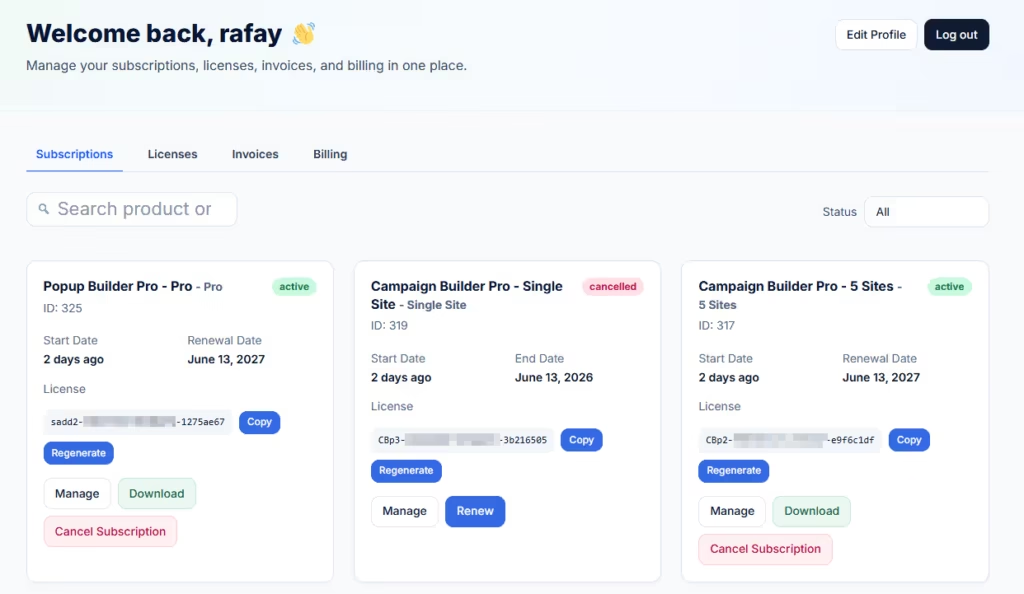
SaaS Dashboard for WooCommerce replaces the default WooCommerce My Account dashboard with a focused SaaS-style customer dashboard. It is designed for stores that sell software subscriptions, license keys, downloadable files, invoices, and billing-managed products.
For stores using Paddle for WooCommerce or SmartPay Paddle Woo, the plugin can support Paddle transaction and billing metadata when available. This helps improve the customer-facing billing experience for Paddle-powered stores.
The plugin adds SaaS-style tabs for Subscriptions, Licenses, Invoices, and Billing. This makes the account area easier to navigate and more relevant for software customers.
For subscriptions, it can show status, start date, expiry date, renewal date, payment method, and available actions. For software licenses, it can show license keys with copy, regenerate, manage, activation count, downloads, and license limit information. For invoices, it can show related orders and renewal dates where expiry dates are not available.
This is valuable because Paddle for WooCommerce subscriptions often involve multiple connected pieces of data. A customer may have a billing record in Paddle, a subscription in WooCommerce, a license key from a software license plugin, and downloads from a WooCommerce product. SaaS Dashboard for WooCommerce helps connect these pieces inside the customer account experience.
Benefits for SaaS Store Owners
A clearer dashboard can improve both customer satisfaction and store operations. Customers can find billing details, renewal dates, license keys, invoices, and downloads without opening a support ticket. This reduces repetitive support work.
It also improves trust. Customers are more comfortable with recurring billing when they can clearly see what is active, what will renew, and which payment method is connected.
In addition, a better account dashboard can support retention. When customers understand their subscription and can manage their software access easily, they are less likely to cancel because of confusion or frustration.
For SaaS sellers, the account area is not just a basic WooCommerce page. It is part of the product experience.
Paddle can be a strong billing option for SaaS and software businesses using WooCommerce. It can help power recurring payments, transactions, and billing workflows. However, customers still need a simple way to understand and manage their account.
A better dashboard for Paddle for WooCommerce subscriptions brings subscription status, renewal dates, payment methods, invoices, license keys, downloads, and billing metadata into one customer-friendly interface.
SaaS Dashboard for WooCommerce improves the default My Account experience by creating a focused customer portal for software and subscription businesses. For Paddle-powered stores, this can make billing and subscription management clearer, faster, and more professional.
Give Paddle-powered WooCommerce customers a clearer billing and subscription dashboard.