
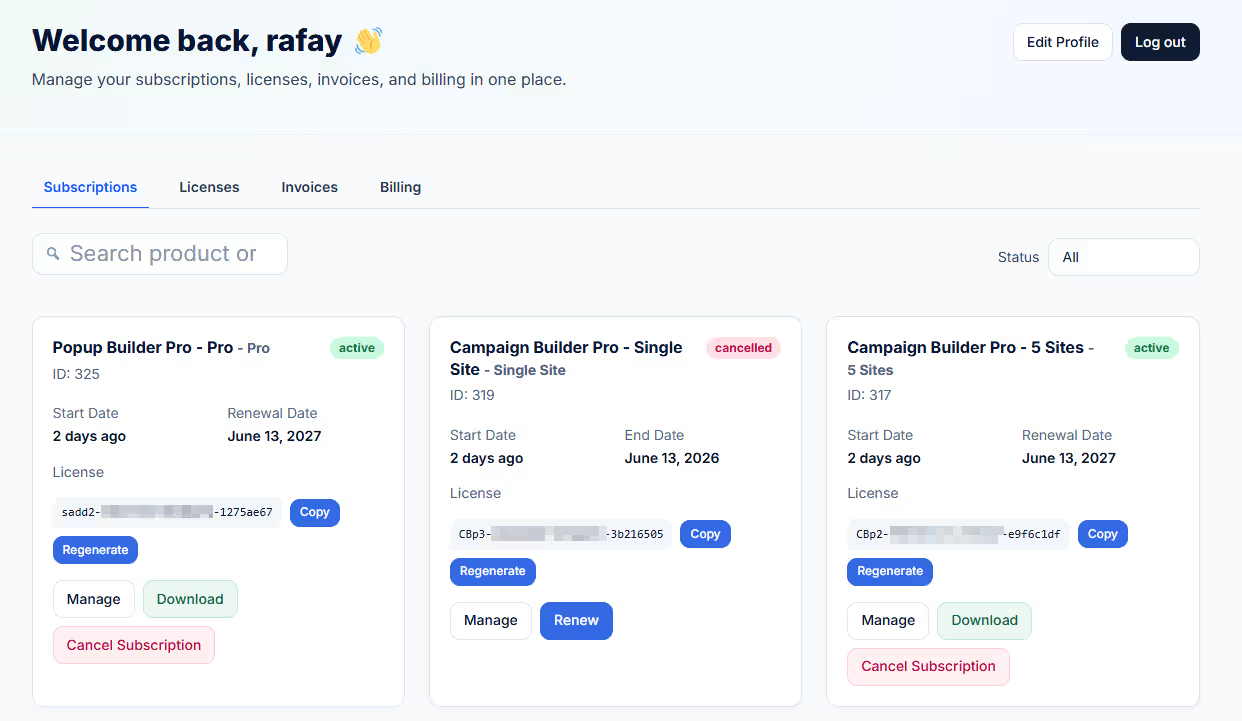
Managing a software business with WooCommerce is very different from running a traditional online store. A normal eCommerce customer may only need order history, shipping addresses, and payment details. However, a software or SaaS customer usually needs much more. They may want to view active subscriptions, manage license keys, download files, check invoices, update billing details, and review renewal dates.
That is where a WooCommerce SaaS dashboard becomes valuable. Instead of sending customers through several disconnected account pages, a SaaS-style dashboard gives them one focused area to manage everything related to their software purchase.
For businesses selling subscriptions, digital products, license-protected software, or Paddle-powered billing through WooCommerce, the default account area can feel limited. A better dashboard can reduce support tickets, improve customer satisfaction, and make your store feel more professional.
What Is a WooCommerce SaaS Dashboard?
A WooCommerce SaaS dashboard is a customized customer account area designed specifically for software, subscription, and digital product businesses. Unlike the standard WooCommerce My Account dashboard, it focuses on recurring billing, license management, software downloads, invoices, and subscription actions.
In a traditional WooCommerce store, customers usually care about order status and delivery tracking. In a SaaS or software store, customers often ask questions such as:
Where is my license key?
When does my subscription renew?
How many activations do I have left?
Where can I download the latest version?
Can I view or download my invoice?
How do I update my billing details?
A SaaS-style customer dashboard answers these questions clearly. It turns the account area into a useful self-service portal.
This matters because customer experience directly affects retention. According to PwC, 73% of consumers say customer experience is an important factor in purchasing decisions. For subscription businesses, this is even more important because customers continue paying only when the product and service experience remain smooth.
Why the Default WooCommerce My Account Dashboard Is Not Enough
WooCommerce is powerful, flexible, and widely used. However, its default My Account page is built for general eCommerce. It works well for stores selling physical products, simple downloads, or one-time purchases. But SaaS and software businesses have more complex account requirements.
The default WooCommerce My Account dashboard usually includes basic sections such as orders, downloads, addresses, payment methods, and account details. While these are useful, they do not always provide a complete SaaS experience.
For example, a customer who buys a software subscription may need to see subscription status, start date, expiry date, renewal date, payment method, license key, activation limit, related downloads, and invoice records. Without a dedicated WooCommerce SaaS dashboard, that information may be scattered across different pages or hidden behind plugin-specific endpoints.
This creates friction. Customers may contact support for information that already exists in the system but is not displayed clearly. Over time, these small issues can increase workload for your support team and make your brand feel less polished.
A SaaS business needs an account area that feels closer to Stripe, Paddle, GitHub, or modern cloud software dashboards. It should be clear, organized, and built around the customer’s active products.
Essential Sections of a WooCommerce SaaS Dashboard
A strong WooCommerce SaaS dashboard should organize customer information into practical sections. The goal is not to overload users with data. Instead, it should show the right information at the right time.
1. Subscriptions
Subscriptions are the heart of most SaaS and software businesses. Customers should be able to see their subscription status, start date, expiry date, renewal date, payment method, and available actions.
For example, if a customer has an active yearly license, the dashboard should clearly show when it renews and which payment method is attached. If the subscription is expired, cancelled, or pending, the status should be easy to understand.
This helps customers stay informed and reduces confusion around renewals.
2. Software Licenses
For software businesses, license keys are just as important as subscriptions. A customer dashboard should show license keys in a clean and secure way. It should also allow useful actions such as copying the license key, regenerating it, managing activations, and checking activation limits.
Displaying license key and activation limits as “Limit” can make the dashboard easier to understand. For instance, a customer may see that a license allows five activations and that three are currently in use.
This kind of clarity prevents unnecessary support requests and helps users manage their software access independently.
3. Downloads
Many WooCommerce software stores sell downloadable files, plugins, themes, apps, or updates. A SaaS-style dashboard should display available downloads directly where customers expect them.
Instead of forcing customers to search through a separate downloads page, the dashboard can show downloadable product files directly on subscription and license cards when available. This is especially helpful for customers who return later to download the latest version of a product.
4. Invoices and Orders
Invoices are essential for both customers and businesses. Many customers need invoices for accounting, tax reporting, or company reimbursement.
A good WooCommerce SaaS dashboard should display invoices and related orders clearly. It should also show renewal dates when expiry dates are not available. This gives customers a better record of their billing history and makes your store look more professional.
5. Billing Details
Billing is another key section. Customers should be able to review payment methods, billing information, and transaction metadata when supported by the payment system.
For stores using Paddle for WooCommerce or SmartPay Paddle Woo, supporting Paddle transactions and billing metadata can make the dashboard more informative. This is useful because Paddle often handles tax, payments, and subscription billing details for software sellers.
How a SaaS Dashboard Improves Support and Customer Retention
A better WooCommerce customer dashboard is not just a design upgrade. It can also improve business performance.
First, it reduces repetitive support tickets. When customers can find license keys, downloads, invoices, and subscription details on their own, they are less likely to contact support for basic account questions.
Second, it improves trust. A professional account dashboard shows customers that your business is serious about software delivery and subscription management. This matters when people are paying monthly or yearly for access.
Third, it improves retention. Subscription customers are more likely to stay when they understand what they are paying for, when they will renew, and how to manage their access.
As customer experience expert Shep Hyken has said, “Customer service is not a department, it’s a philosophy to be embraced by everyone in an organization.” A SaaS dashboard supports that philosophy by making service easier, faster, and more transparent.
How SaaS Dashboard for WooCommerce Solves This
SaaS Dashboard for WooCommerce replaces the default WooCommerce My Account dashboard with a focused, SaaS-style account experience. It is designed for stores that sell software subscriptions using WooCommerce, WooCommerce Subscriptions, Paddle for WooCommerce or SmartPay Paddle Woo, and the Software License plugin by NSP Code.
Instead of leaving customers with a generic account page, this plugin organizes the most important software business data into SaaS-style tabs. Customers can access Subscriptions, Licenses, Invoices, and Billing from one clean interface.
The plugin shows customer subscriptions with status, start date, expiry date, renewal date, payment method, and available actions. It also displays software license keys with copy, regenerate, manage, activation count, downloads, and license limit information.
For stores that sell downloadable software, the plugin can show available files directly on subscription and license cards. This creates a smoother experience because customers do not need to jump between unrelated pages to find what they need.
It also supports invoices and related orders, including renewal dates where expiry dates are not available. In addition, Paddle transaction and billing metadata can be displayed when available, making the dashboard useful for stores that rely on Paddle-powered billing.
In other words, SaaS Dashboard for WooCommerce turns the standard WooCommerce My Account dashboard into a more practical software customer portal.
Why Store Owners Should Use a WooCommerce Account Dashboard Plugin
Building a custom dashboard from scratch can be expensive and time-consuming. It may require custom development, plugin integrations, template overrides, and ongoing maintenance. For many store owners, using a dedicated WooCommerce account dashboard plugin is a faster and more reliable option.
A plugin built specifically for SaaS and software businesses can connect the most important account data without requiring customers to understand how WooCommerce stores that information behind the scenes.
This is especially useful when your store depends on multiple systems, such as WooCommerce Subscriptions, Paddle billing, and software license management. A dedicated dashboard brings these elements together in one place.
The default WooCommerce My Account page is useful for standard online stores, but SaaS and software businesses need a more focused experience. Customers want quick access to subscriptions, software licenses, invoices, billing details, and downloads. When this information is difficult to find, support requests increase and the customer experience suffers.
A WooCommerce SaaS dashboard solves this problem by giving customers a modern self-service account area built around software subscriptions and license management. It helps users understand their subscription status, manage license keys, download products, view invoices, and review billing information without friction.
SaaS Dashboard for WooCommerce is designed for exactly this purpose. It replaces the generic WooCommerce account page with a focused SaaS-style customer dashboard for software businesses.
Give your WooCommerce software customers a focused SaaS-style account dashboard.